| 代码 |
| imagex /mountrw c:\vistape\winpe.wim 1 c:\vistape\mount |
| 代码 |
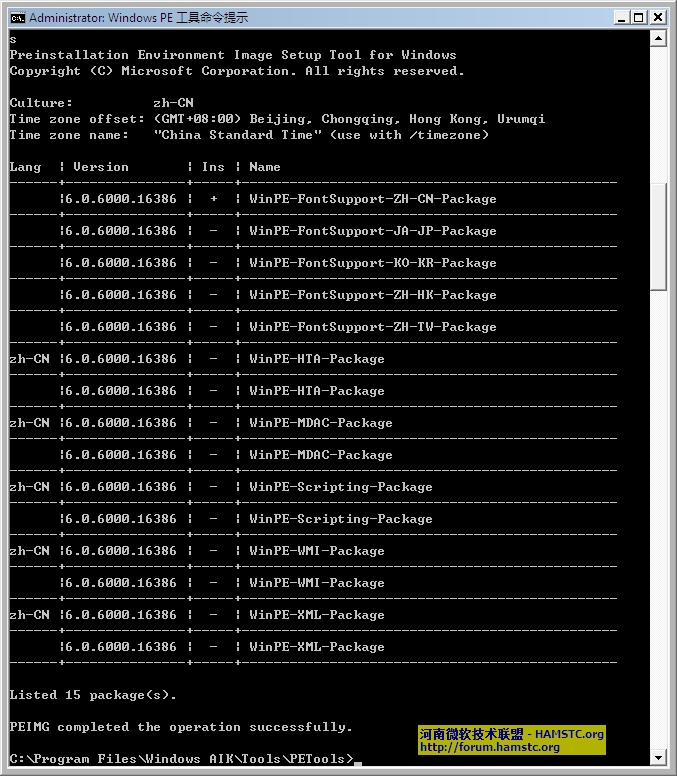
| peimg /list c:\vistape\mount\windows |
| 代码 |
| peimg /install=*HTA* c:\vistape\mount\windows |
| 代码 |
| peimg /prep c:\vistape\mount\windows[code] 4、重新封装映像,将更改提交至映像。 [code] imagex /unmount c:\vistape\mount /commit |
| 代码 |
| copy c:\vistape\winpe.wim c:\vistape\iso\sources\boot.wim |
| 代码 |
| oscdimg -n -bc:\vistape\etfsboot.com c:\vistape\iso c:\vistape\vistape.iso |
| 代码 |
| diskpart select disk 0 clean create partition primary size=512 select partition 1 active format fs=ntfs exit |
| 代码 |
| d:\imagex /apply d:\sources\boot\wim 1 c: xcopy d:\boot\*.* /e /f c:\boot copy d:\bootmgr c: del c:\boot\bcd |
| 代码 |
| bcdedit -createstore c:\temp\BCD 注:如果提示错误,请现在C盘下建立temp这个目录 bcdedit -store c:\temp\bcd -create { bootmgr } /d "Microsoft Boot Manager" bcdedit -store c:\temp\bcd -set { bootmgr } device boot bcdedit -store c:\temp\bcd -create /d "Microsoft Windows Vista PE" -application osloader bcdedit -import c:\temp\bcd 注:在上面的命令中惠返回一个 GUID 值,请记录下来并替换下面命令行中的 GUID。 bcdedit -store c:\boot\bcd -set GUID osdevice partition=c: bcdedit -store c:\boot\bcd -set GUID device partition=c: bcdedit -store c:\boot\bcd -set GUID path \windows\system32\winload.exe bcdedit -store c:\boot\bcd -set GUID systemroot \windows bcdedit -store c:\boot\bcd -set GUID winpe yes bcdedit -store c:\boot\bcd -set GUID detecthal yes bcdedit -store c:\boot\bcd -displayorder GUID -addlast |
| 欢迎光临 邮件服务器-邮件系统-邮件技术论坛(BBS) (http://bbs.5dmail.net/) | Powered by Discuz! X3.2 |